

WoW Armory – is a simple utility instrument for World of Warcraft game that consists of information about all characters’ PvP and PvE statistics, collectibles, gear and achievements. The tool has an ergonomic design, therefore information about all player needs is displayed in many ways better than in the game. Gamers use it to find detailed statistics about World of Warcraft characters, item level, achievements, raid and dungeon progress. Gamers can compare their heroes with pro players: MDI and AWC league champions or popular streamers. However, even considering Blizzard is now actively developing hardcore WoW and Season of Discovery, classic players still can’t use the official Armory since this feature involves only retail characters.
WoW Armory is a complex tool gamers use to get information about characters to help in a playthrough.

Summary information locates on the top and shows a title, hero level, item level, race, class, guild name and characters server. All detailed info at the site divides into different sections to show detailed information:
All of these features allow WoW Armory to be useful in many ways for every player because a statistical tool adequately utilized for the game dramatically increases the chances of becoming successful in those aspects of WoW that the player has chosen to develop.
Since Blizzard has a rule restricting gamers from one server from playing in another with the same subscription and players can’t transfer chars between servers, WoW Armory also divides by regions. World of Warcraft currently has three giant servers: EU, Asian, and US. Previously, there was Chinese too, but due to a disagreement between the Chinese publisher and Activision Blizzard, all Blizzard company activities were suspended, and all WoW realms – shut down.
World of Warcraft is a game from a US developer, so it’s unsurprising: the most significant community and server are US ones. The US WoW server consists not only of North America (including the USA and Canada), as in many other games, but also of South America, Oceania, and Australia. This massive WoW server is a cluster segmented by geographic location. So, players who want to move from one place to another within the availability of these servers will be fine. Even if their home realm has a higher ping than they are used to, there is always the option to transfer to a realm that is more accessible to the game in terms of internet connection. This also applies to WoW Armory, so all the characters in listed locations will be displayed on the US version of the website.
WoW EU Armory, same as the server, is more compact compared to US one but, therefore, more accessible to players from different countries if they moved or want to play with their friends in the same realms. Due to the absence of such a big ping problem, the EU region is divided not so much by territorial but by linguistic parameters. The server includes English, French, Russian, German, Spanish, Italian realms, accessible to players only by using the corresponding language in-game settings. But all the characters in these realms are displayed in EU WoW Armory, no matter what language settings gamers have. Players from EU realms wouldn’t be able to find their characters using US version of Armory tool and vice versa. When the char is inaccessible to search in Armory, users must switch our tool to another region.
Although Blizzard does not support WoW Armory for classic servers, many fan-made tool versions exist. One such tool is IronForge website, which uses a similar system to Armory but targets versions of the Classic expansions.
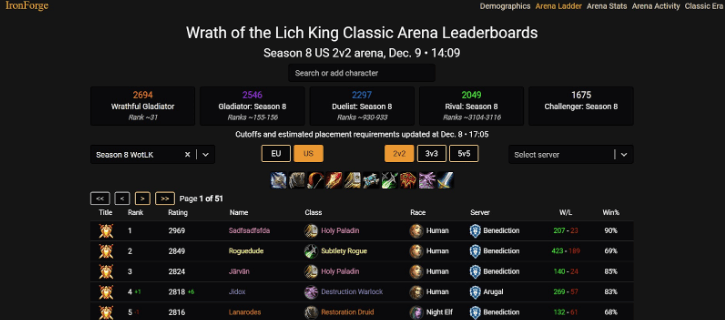
The instrument consists of two main pages, one for the WoW Classic Era and another for Wrath of the Lich King or Cataclysm. For both versions of this simple Armory tool, we have a hero’s tab that displays the same information as an official WoW Armory. It consists of a server person playing, all the items he has, level, class, race, item level of dressed clothes, honorable kills, name, guild, and chosen talents in the Classic Era. In Wrath and Cata, gamers can check Arena Statistics with graphs and secondary talents.
WoW WotLK page includes the Main tab, where you can search for the character, Demographics tab, Arena Ladder, Stats and Activity tabs. The Demographics tab displays all realms in World of Warcraft, divided by EU and US servers, with an option to filter them by realm type, be it PvP, PvE, or RP servers and shows the quantity and percentage of players on both fractions. Arena Ladder includes the following information: gladiators, duelists, and rivals from each season since Classic WotLK came out, their win/lose statistics, ratings in 2v2, 3v3 and 5v5 matchups. Arena Stats displays graphs with class distribution by rating in all the seasons in both regions. Arena Activity shows characters sorted by rating in all arena versions.
On the Classic Era page, gamers see Armory and Servers – the same as the Main tab for searching and Demographics tab in the Wrath version of the website. On the following page players check Honorable Kills and Gearscore tabs, similar ones, with a list of characters divided by Kills and item levels.
The most common Armory-related topics that WoW players are interested in besides their characters are pages of famous streamers and high-tier players. For example, one of the most popular armory pages is the Asmongold’s Warrior on the Kel’Tuzad server. We have listed the statistics about famous streamers and top-tier players in WoW.
| Streamer page | Main Character | Server | Average Twitch views |
| Asmongold/Zackrawrr | Asmongold | Kel’Tuzad | 41,513 |
| Sodapoppin | Sodapoppin | Demon Soul | 22,010 |
| EsfandTV | Esfand | Kel’Tuzad | 8,928 |
| Xaryu | Xaryu | Tichondrius | 6,834 |
| Ziqoftw | Ziqo | Jaedenar | 2,798 |
| Pikabooirl | Tmpikaboo | Tichondrius | 1,870 |
| Bajheera | Bajheera | Sargeras | 319 |
| VanguardsTV | Vanguards | Tichondrius | 187 |
All these players are well-known in the World of Warcraft community. No matter how big their audience is, gamers watch them not only for entertainment but also to see a mastery in any aspect of World of Warcraft but learn new hints and tricks from them. Streamers characters are iconic, and everybody can compare popular gamers achievements or gear with their own, thanks to WoW Armory’s capabilities and features.
WoW Armory is a massive, complex tool that raises many questions for both new and old players trying to use it for the first time.

The problems encountered when using WoW Armory tool can be related to in-game problems, WoW server issues, poor internet connection, data loss, Blizzard website malfunction, or other situations causing errors in the operability of this instrument. We gather all the common problems users can encounter with Armory and the solutions for such cases.
From time to time, new bugs appear in WoW Armory, like on any other website, and players always want to know the solution. The community was always working on these problems regardless of the type and origin of the problem, whether it was a user-side or server issue. But all the situations gamers deal with can be solved and we are always pleased to help!
